Why Choose a Smart Lectern for Your Business?
Why Choose a Smart Lectern for Your Business?
A Smart Lectern can transform a standard presentation area into a focused communication hub. It combines display control, microphone management, connectivity, and presentation tools in one professional workstation. Speakers can adjust content from the lectern, rather than searching for cables or leaving the stage repeatedly. That small change can improve confidence.
The room feels calmer.
AV technology educator Paul Richards has said, “The best technology supports the speaker without becoming the performance.” This principle explains the value of a Smart Lectern. Its purpose is not to impress visitors with unnecessary features. Its purpose is to make communication clearer, faster, and more dependable.
For businesses, the benefits appear in practical moments. A presenter can connect a laptop, display slides, and control media from one surface. A built-in microphone system can reduce setup time before a meeting. Integrated branding panels can also make boardrooms, training centers, and reception stages look more consistent.
Still, smart equipment is not automatically better. A poorly planned lectern may create confusing menus, hidden cables, or difficult maintenance. That is an uncomfortable point. Businesses should evaluate room size, user skills, service access, and future upgrades before purchasing.
Good planning matters.
A reliable Smart Lectern should support presenters quietly, protect valuable equipment, and remain simple during pressure-filled meetings. When selected carefully, it becomes more than furniture. It becomes a dependable part of the business communication experience.
Define Smart Lecterns with AVIXA’s $306.4B Global Pro AV Revenue Estimate
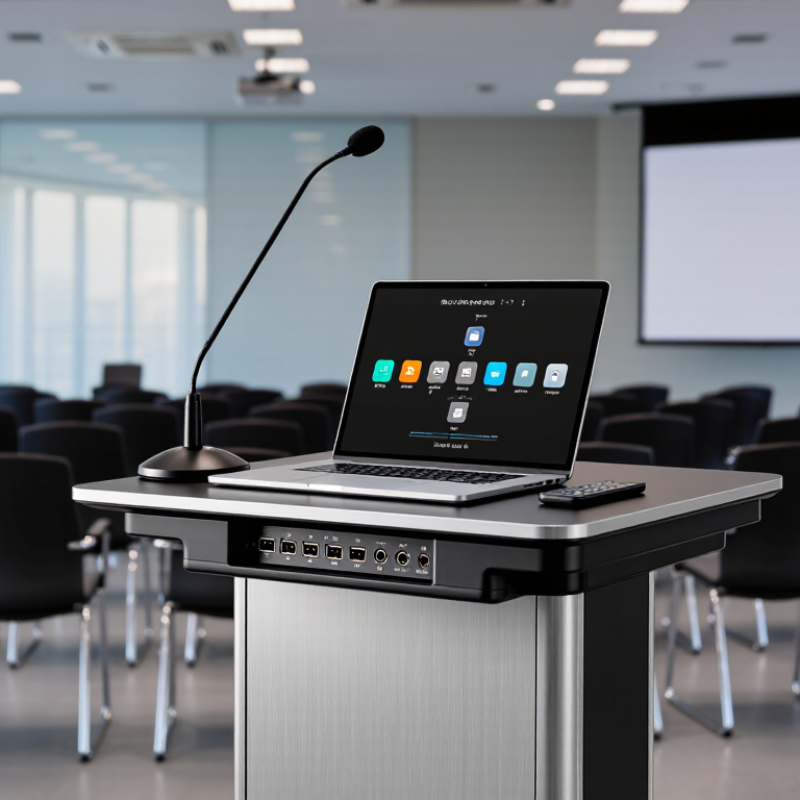
AVIXA’s estimated 306.4 billion dollars in global professional AV revenue shows the scale of modern communication technology. This figure reflects growing demand for reliable presentation, collaboration, and control systems. A smart lectern fits this expanding environment by combining display control, microphones, connectivity, and room management in one workstation.
In practice, a presenter can connect a laptop, adjust lighting, switch sources, and monitor audio from a touch panel. Cable clutter becomes less distracting. A built-in confidence monitor can display speaker notes while the audience sees clean visual content. These details matter in training rooms, boardrooms, lecture halls, and customer briefings.
The technology still needs careful planning. A powerful lectern cannot fix poor acoustics or confusing room layouts. We sometimes over-specify equipment and underinvest in user training. That is a costly mistake. Experienced AV professionals should assess viewing distance, network capacity, accessibility, maintenance, and emergency procedures before installation. Controls should feel clear at first touch. They should also remain usable when a presenter is nervous, rushed, or unfamiliar with the system.
A smart lectern should support people, not impress them. Small failures still matter. A loose cable or delayed screen can interrupt a critical meeting. Regular testing, documented settings, and responsive technical support improve reliability. With AVIXA’s market estimate as context, businesses can view smart lecterns as practical infrastructure rather than decorative furniture.
Assess Hybrid-Work Demand: Microsoft Found 73% Prefer Flexible Work Options
A smart lectern can support the changing rhythm of modern business. One widely cited workplace survey found that 73% of employees prefer flexible work options. That figure deserves attention. Hybrid work is no longer an occasional arrangement for many teams. Meetings may include a manager in the room, a designer at home, and a client overseas.
A smart lectern helps connect these spaces. Its integrated display, camera, microphone, and control panel can reduce setup time. Staff can begin a presentation without searching for cables or adjusting several devices. In a real meeting room, that matters. A delayed five minutes can weaken attention and confidence.
The technology must fit actual work habits. A polished lectern cannot repair poor meeting planning. It may also require training, maintenance, and thoughtful room design. Some teams may prefer a simple mobile stand. That is a valid concern.
Test before purchasing. Invite remote employees to judge sound clarity and camera framing. Ask presenters whether controls feel natural under pressure. Check accessibility, screen visibility, and data protection procedures. These practical tests provide stronger evidence than attractive specifications.
Flexible work needs flexible spaces. A smart lectern can make those spaces more consistent, provided businesses measure real usage instead of assuming every feature will be valuable.
Compare Core Features Using AVIXA Standards for Professional AV Systems
Why Choose a Smart Lectern for Your Business?
A smart lectern should support clear communication, not merely look modern. Using AVIXA standards and guidance, compare speech intelligibility, display performance, control response, and system reliability. In a real meeting room, a speaker should hear natural voice reproduction without raising their voice. Remote participants need stable audio, consistent camera framing, and readable presentation content.
Check the microphone type, pickup pattern, acoustic coverage, and feedback control. Measure room sound instead of trusting product claims. AVIXA performance verification practices encourage defined requirements before installation. A lectern should also provide suitable brightness, contrast, viewing angles, and connection options. HDMI, USB, network access, and wireless sharing can reduce setup delays. Cable management matters more than expected.
Accessibility deserves equal attention. Controls should be reachable, clearly labeled, and usable by people with different abilities. A good interface needs few steps. Very few. During testing, verify startup time, mute behavior, screen switching, and recovery after a network interruption. I have found that elegant systems sometimes hide confusing controls. That weakness deserves honest review. Also, not every room needs every feature. A smaller business may gain more from dependable audio and simple maintenance than from advanced automation. Record test results, train staff, and schedule periodic checks against the original AVIXA-based requirements.
Why Choose a Smart Lectern for Your Business?
A smart lectern can centralize presentation control, speech reinforcement, visual content, connectivity, and system monitoring. The chart shows a practical professional AV readiness checklist aligned with measurement areas addressed by AVIXA standards, including audio coverage, image size, contrast, and system documentation. Scores indicate the number of capabilities supported by each solution type; they are not AVIXA certification ratings.
Reference areas: ANSI/AVIXA 10:2013 for audio coverage uniformity, ANSI/AVIXA 3M-2017 for projected image contrast, ANSI/AVIXA V202.01:2016 for display image size, and AVIXA guidance on professional AV system documentation and verification.
Calculate Business ROI Through Utilization, TCO, and Maintenance Metrics
Why Choose a Smart Lectern for Your Business?
A smart lectern should earn its place through measurable business value. Track usage hours, booked sessions, setup time, and support tickets. Then calculate utilization: active presentation hours divided by available hours. A lectern used 18 hours weekly from a 40-hour schedule reaches 45% utilization. That figure is more useful than impressive specifications. AVIXA’s 2024 Industry Outlook expects the professional audiovisual market to approach $402 billion by 2028, increasing pressure to prove technology value. Still, utilization data can mislead when rooms remain reserved but unused.
Total cost of ownership includes purchase, installation, software, training, electricity, repairs, and replacement parts. Compare these costs with avoided rental fees, reduced technician hours, and faster room turnover. A simple ROI model is: (annual benefits minus annual operating costs) divided by initial investment. The U.S. Department of Energy’s Operations and Maintenance Best Practices guide reports potential savings of 5% to 20% through stronger maintenance practices. That range is not guaranteed. Dust, cable failures, and inconsistent user training can erase projected gains quickly.
Tips: Review quarterly. Record real labor minutes, not estimates. Set alerts for repeated faults. Keep a spare connection cable nearby. Test accessibility features with actual users, because a technically successful installation may still create frustrating experiences. Capture failed sessions too. They reveal the hidden cost of unreliable presentation technology.
Why Choose a Smart Lectern for Your Business? - Calculate Business ROI Through Utilization, TCO, and Maintenance Metrics
Three-year comparison based on one frequently used business presentation room. Values are presented in U.S. dollars and are intended as a transparent planning model using measurable operating assumptions.